Line Balancing
Balance assembly lines and work cells in seconds. Drag and drop work content to optimize by operator count, production target, or takt time, then export Yamazumi, Gantt, and Pareto charts.
Balance Lines and Work Cells in Seconds
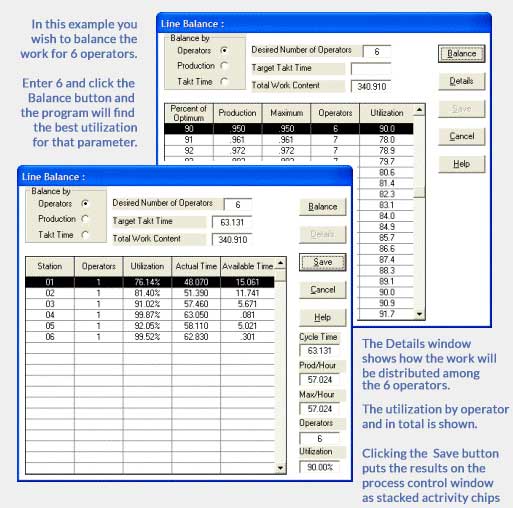
Timer Pro’s line balancing software lets you balance work content by:
- Number of operators
- Required production
- Takt time
Drag and drop activities between stations and see the balance update immediately.
Maximize Value-Added Work Content
Color-code value-added, non-value-added, and required non-value-added activities to reveal improvement opportunities at a glance. Save each line balance variation for review with supervisors and operators.
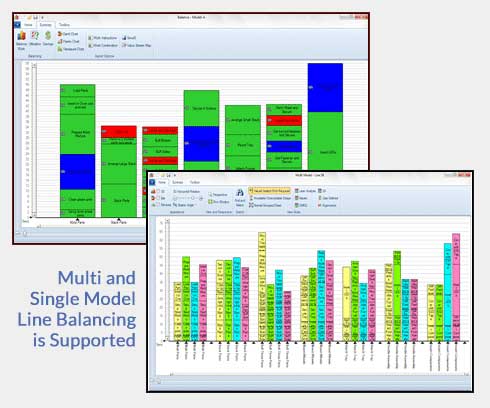
Yamazumi, Gantt, and Pareto Charts in Seconds
Use line and work cell balancing to identify opportunities to improve production flow, redistribute work, and reduce labor requirements. Create Yamazumi charts alongside Gantt and Pareto views with a single click-see the Yamazumi Charts module for more.
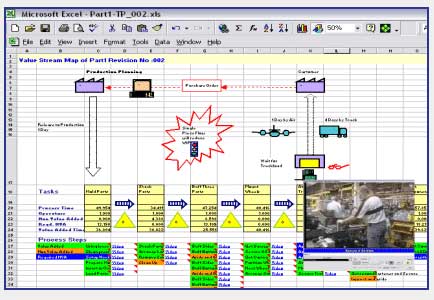
Value Stream Mapping
Send the current line balance into a Value Stream Map template with one click, then map current and future state conditions. The template is built in Excel, so no additional mapping software is required.
From one time study, Timer Pro creates a visual, repeatable line balancing process that engineers, supervisors, and operators can review and implement together.
Frequently asked questions
What is line balancing?
Line balancing is the process of distributing work elements across operators or stations so that workloads align as closely as practical with the required production rate or takt time. The aim is to create smoother flow, reduce waiting, and expose overloaded or underused stations.
What is the goal of line balancing?
The goal is to distribute work so each station can meet the required production pace with less imbalance, waiting, and unnecessary labor. A good balance also makes bottlenecks and improvement opportunities easier for engineers and operators to see.
What is the difference between takt time and cycle time?
Takt time is the production pace required to meet customer demand. Cycle time is the time a station or process actually takes to complete its work. Comparing station cycle times with takt time shows where work may need to be redistributed or improved.
How does line balancing software work?
Line balancing software uses measured activity times to visualize the workload at each station. Engineers can move activities between operators or stations and compare alternative balances against operator count, required production, or takt time.
What is a Yamazumi chart?
A Yamazumi chart is a stacked operator balance chart. Each bar represents an operator or station, while the segments show individual work elements and their durations. Comparing the bars with takt time helps teams identify uneven workloads and redistribute activities.
How does line balancing identify bottlenecks?
A line balance makes station workloads visible against the required production pace. Stations whose cycle time approaches or exceeds takt time are likely constraints, while shorter bars can reveal available capacity, waiting, or opportunities to redistribute work.
Can a line be balanced by operator count or production target?
Yes. Timer Pro can model balances using the available number of operators, required production per hour, or takt time. This allows teams to compare scenarios and understand how changes to staffing or demand affect station workloads.
When should a production line be rebalanced?
Review the balance when demand, product mix, staffing, equipment, layout, or standard work changes. Rebalancing is also useful after process improvements because removing or shortening activities can create a new distribution of work across the line.
Continue the improvement process
Timer Pro Vision AI
Accelerate process analysis with Timer Pro's proprietary AI engine.
Yamazumi Charts
Instant Yamazumi charts straight from your time studies, with video linked to every activity.
SMED Setup Reduction
Reduce changeover downtime by quantifying every setup-reduction improvement instantly.
See Line Balancing on Your Own Work
Request a free evaluation or book a custom demo to see how Timer Pro balances work across your production line or cell.