Process Failure Mode
and Effects Analysis
Anticipate and prevent process failures before they happen with Timer Pro's PFMEA software—fully customizable, Excel-based forms with automatic revision control.
Anticipate and Prevent Potential Issues
A PFMEA (Process Failure Mode and Effects Analysis) form associates a risk level with each step of a process. PFMEA is designed to prevent defects by anticipating potential issues, so you can put control measures in place in advance.
Risk is typically quantified by calculating a Risk Priority Number (RPN) for each process step. Many ranking scales are in use; one example can be found at DMAIC Tools.
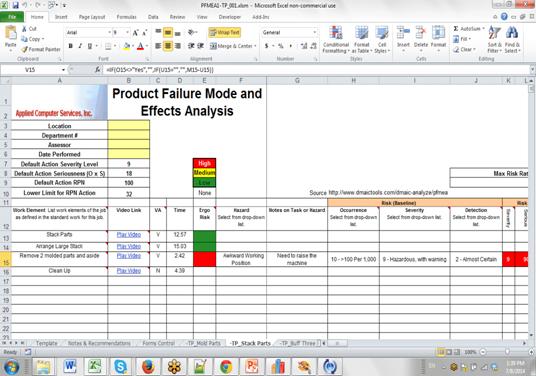
Built in Excel, Managed Like Work Instructions
Because Timer Pro’s PFMEA is done in Excel, you can customize any number of forms to meet your specific needs and work completely independently of any application. PFMEA forms management uses the same revision control capabilities that are standard in Timer Pro work instructions, so you can automatically maintain revisions of your PFMEAs.
Advantages of Timer Pro PFMEA
- Ideal for all manufacturers and suppliers.
- Excel PFMEA worksheets can be used independently of Timer Pro.
- Create any number of PFMEA Excel formats for your different areas.
- Completely user-definable severity, occurrence, and detection parameters for RPN calculations.
- Define your own severity ranges, color coding, and actions for Baseline, Control Measures, and Current States.
- Video (if used) is linked to each activity for review directly from Excel.
With Timer Pro, PFMEA becomes a flexible, video-linked, and version-controlled part of your continuous-improvement workflow-helping you stop defects before they reach the customer.