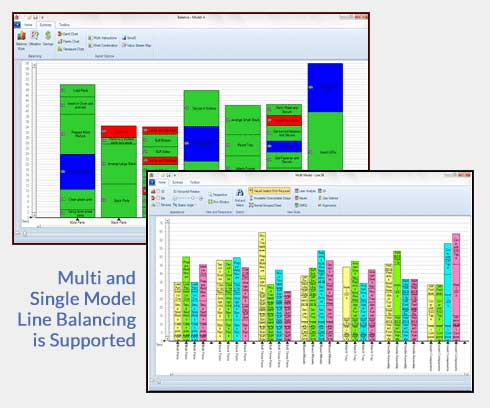
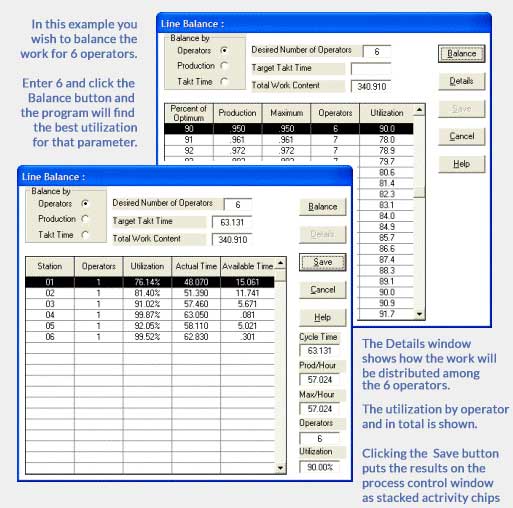
Timer Pro Professional’s Line Balancing module allows you to balance your work content by:
Number of Operators
Desired Production
Takt Time
Drag and drop work content as required. It’s that simple. It’s that easy
Maximize Your Value Added Work Content
Color code value added, non-value added and required non value added activities to highlight improvement opportunities. In seconds, each variation can be saved for review with supervisors and staff.
Click on Images to Enlarge
Produce Toyota’s Yamazumi Charts, Gantt and Pareto Charts in Seconds
Line and work cell balancing is an effective tool to improve the throughput of assembly lines and work cells while reducing manpower requirements and costs.
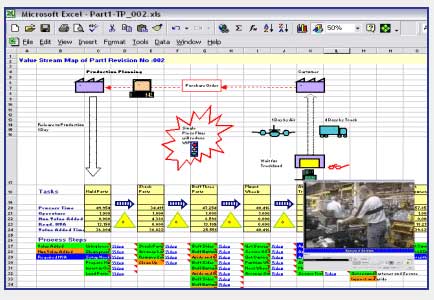
Value Stream Mapping
A single click will pass the current balance results into a Value Stream Map template. In this way you can easily map both current and future state conditions. The Value Stream Map is in Excel – no special software is required.
Click on Images to Enlarge
Google Unwanted Software Policy Compliance Statement
We hereby attest that the software application offered here is developed, owned and distributed by us for the purposes of process measurement to support your continuous improvement initiatives; will not affect the performance of your system hardware or change any system settings; is easily completely removable from your system; does not collect or transmit any private information in any form; is not bundled with any other software; is free of malware.